The above window is familiar to those who use 2 operating systems. We can DUALBOOT two operating systems such as WINDOWS8 ,WINDOWS7 ,XP etc any combination of these operating systems are possible
We install different operating systems on different drives. everything goes smooth and we can use booth the operating systems as our wish by choosing the appropriate one at the start up
NOW HOW TO REMOVE ONE OF THESE OS?
Yes the answer is quite simple just format the drive which contains that operating system.
but, at the start up you will be again asked to choose the operating system
the same screen appears .
here is a simple solution:
Browse to Control Panel\System and Security\Systemand click on advanced system settings
A new window will open now click on settings under system startup and recovery
Now select the operating system which is desired and uncheck in the box that is highlighted in the pic below
you wont get a start up boot menu option if u follow these steps the default operating system will be loaded automatically :) Also check: How to lock a folder with out using software.
Folder lock without any software by using notepad.
Most of us usually have confidential data on our Pc's. It is very important to hide the confidential data in Windows. Some time the data which is really private need to be secured from the third-party.
Although there are some trail versions available for folder lock software but these all come with an expiry period. So these can’t be used after some time. But by using the steps explained here, you will be able to create a folder which can be locked by password. All the data placed in this folder will be password protected. So you can place all data which you want to hide from other users in this folder. This method works 100% on all versions of Microsoft Windows operating system.
Step by Step Process to Lock a Folder (with video)
1.Open a new notepad.
2.In that copy and paste the below source code.
CODE:
cls :End @ECHO OFF title Folder Locker if EXIST "Control Panel.{21EC2020-3AEA-1069-A2DD-08002B30309D}" goto UNLOCK if NOT EXIST Locker goto MDLOCKER :CONFIRM echo Are you sure u want to Lock the folder(Y/N) set/p "cho=>" if %cho%==Y goto LOCK if %cho%==y goto LOCK if %cho%==n goto END if %cho%==N goto END echo Invalid choice. goto CONFIRM :LOCK ren Locker "Control Panel.{21EC2020-3AEA-1069-A2DD-08002B30309D}" attrib +h +s "Control Panel.{21EC2020-3AEA-1069-A2DD-08002B30309D}" echo Folder locked goto End :UNLOCK echo Enter password to Unlock folder set/p "pass=>" if NOT %pass%==123456789 goto FAIL attrib -h -s "Control Panel.{21EC2020-3AEA-1069-A2DD-08002B30309D}" ren "Control Panel.{21EC2020-3AEA-1069-A2DD-08002B30309D}" Locker echo Folder Unlocked successfully goto End :FAIL echo Invalid password goto end :MDLOCKER md Locker echo Locker created successfully goto End :End 3.After you copy the commanding,you will find this one in the source code:"123456789"(change it with any password you want).In this i used yashu as password. For example: if NOT %pass%== alltechtricks goto FAIL //so your password here becomes alltechtricks .//
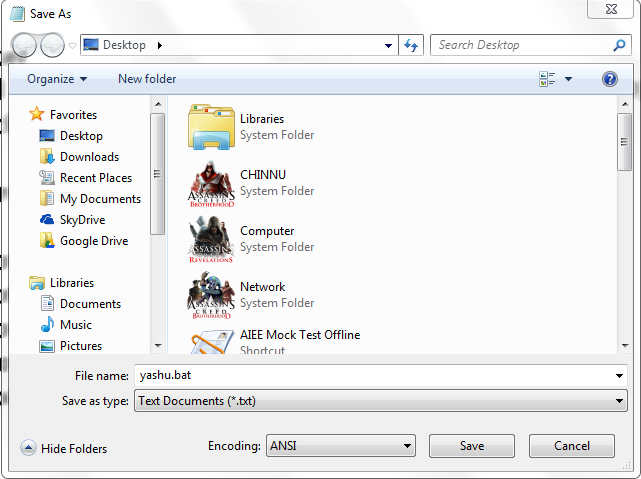
4.After that go to Save as… & name this file as “locker.bat “. Be sure to change the“Save as type” from “text” to “All Files” :
5.Now a batch file will appear on the desktop.
6.Double click on the batch file,now an ms dos prompt will pop out saying "ENTER THE PASSWORD TO UNLOCK THE FOLDER".
7.Now type the password which you have used in the source code.
8.Now a folder named "LOCKER" will appear on the desktop.
9.Now drag the file which you want to protect in to the folder.
10.In order to lock the folder,again double click on the batch file and press y and your folder will disappear.
11.Now your folder will be invisible and protected but your batch file will be there.
12.If you want to unlock it,double click on the batch file and enter the password. 13.But by using this there is a risk,one can see the password by right clicking on the bat file and click edit,it will show you the source code which you have used previously.In order to prevent it we use a software named Bat_To_Exe_Converter. 14.You can download this by clicking here(click here). 15.After,downloading it ,you should have a zip file.Now extract it you will find this.
16.Now,go into the folder and select the OS i.e either 32-bit or 64-bit.Go into the your bit(i.e 32 or 64 bit). Now run the application and a screen will pop up like this.
16.Now choose the .bat path and click on COMPILE.
17.Now you see an .exe application on the desktop.
18.That's it friends now you can delete the .bat file and you can use .exe file Now your private data is totally protected.
it works good with windows 7,xp,vista.
NOTE:
It not only hides the folder,But hides all the files and try it without Also the password it will go to the control panel.
Also if you want to store files on pen drive, you can use the script.No software required.
Video tutorial for How to lock a folder:
That's it. now you can lock any folder using above method.if you find any dificulty or if you want any help just comment below feel free to ask.If you are successfully done then share your experience by commenting below Also check :How to Increse your facebook Security.